
Glossary term
ActiveX
ActiveX let websites use software installed on a Windows computer to do things such as play media, deliver updates, or control a camera. It made some web pages feel like full applications, while tying them to Internet Explorer and Windows.
You could open a website and watch a camera feed, move the camera, or install updates for Windows itself. ActiveX made the browser a doorway into things your computer could do. Sometimes, before any of that worked, you had to agree to install another piece of software.
A website could put Windows to work
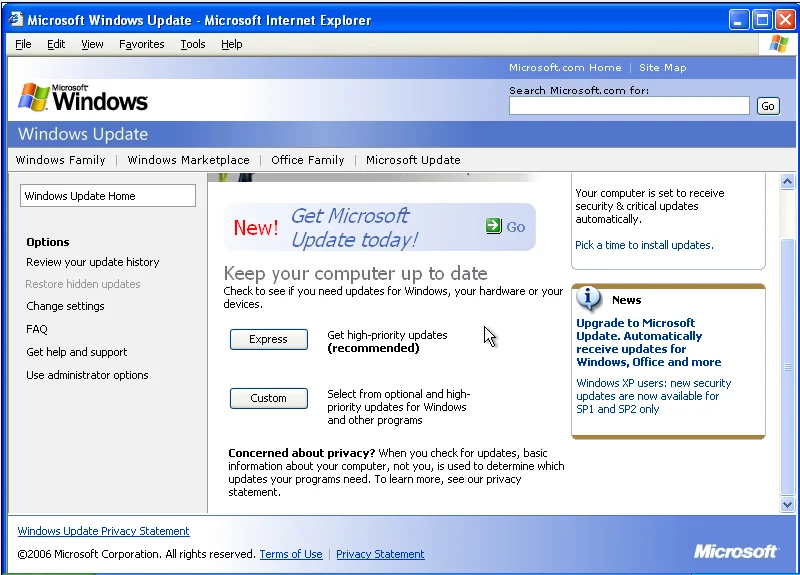
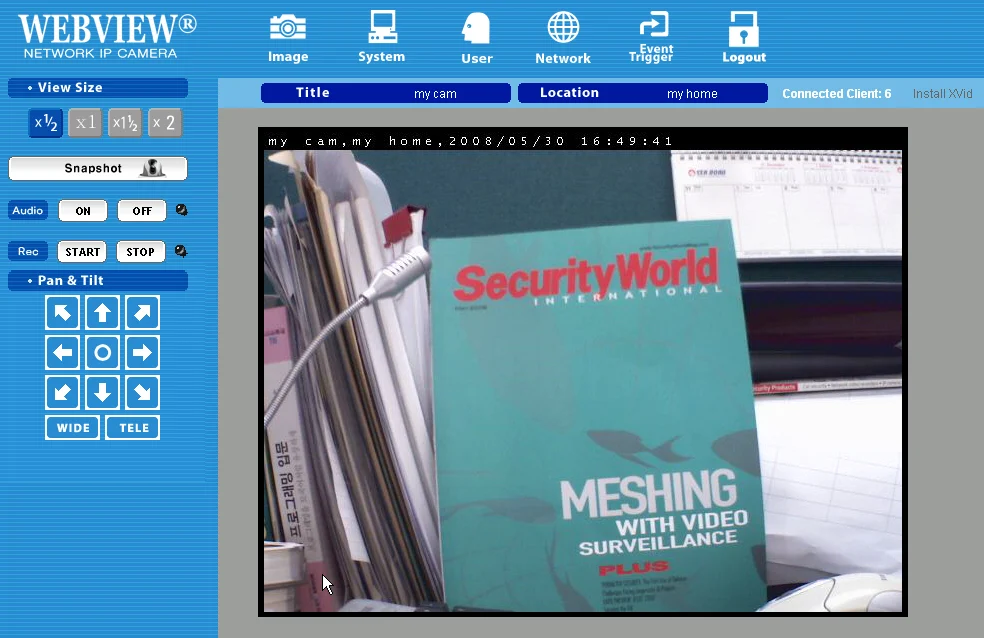
For a visitor, the useful part was what happened on screen. Windows Update could help get the computer up to date. A network-camera page could show live video and offer buttons for recording, taking a snapshot, or changing the view. Those features made a web address feel like the entrance to an application.
ActiveX supplied the connection to software on the computer. A website could draw on capabilities beyond the browser’s usual page features, including media players such as Windows Media Player. Opening the page was only the beginning of what the computer was being asked to do.
It worked—on the right computer
That power came with a catch. The page might need Windows, Internet Explorer, and a particular installed component. “Use Internet Explorer” could mean the application genuinely depended on it. Opening the same address in another browser did not guarantee the same result.
This pulled against one of the web’s great attractions: people with different computers could visit the same address. ActiveX brought more of the Windows application world into that address, along with its dependencies. The browser could become a frame around software that had much more specific requirements.
Java applets also depended on extra software, but Java aimed to carry the same program across different platforms. ActiveX made a much closer connection to Microsoft’s own desktop environment.
Getting to the page could mean installing something
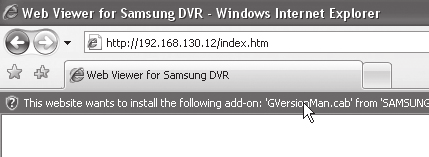
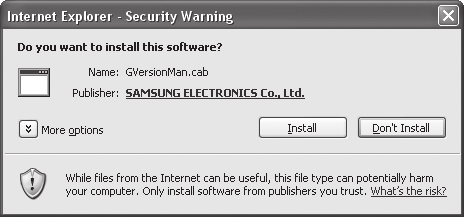
The Samsung camera-viewer sequence below makes that interruption familiar. First came a bar asking to install an add-on. Then a dialog identified the publisher and offered an installation choice. You wanted to see the cameras; getting there involved a decision about software.
The security concern followed from that arrangement. A component downloaded for a website still ran on your computer, where flaws or malicious behavior could do harm. It also needed maintenance. Visiting a page and keeping an application working had become tangled together.
ActiveX faded from everyday browsing, but applications built around it could be difficult to leave behind. Microsoft still provides Internet Explorer mode for certain legacy sites in Edge. Those surviving dependencies are part of the story: getting powerful software into a browser was easier than making every system built around it easy to replace.
Frequently asked questions
What is an ActiveX control?
A reusable piece of software that another application can load. Internet Explorer used controls to add capabilities inside web pages. ActiveX was also used in Windows applications outside the browser.
Does ActiveX still work?
Some older applications still use it. Normal Edge pages do not run ActiveX controls, but Microsoft’s Internet Explorer mode supports them for configured legacy sites. Other current mainstream browsers do not offer that Windows-and-Internet-Explorer setup.
Ephemera
Updating Windows, watching a camera feed, and installing the component that made it work. These are original interfaces from the ActiveX web.
Related reading
 A PROGRAM INSIDE THE PAGE
Java Applets
The page came alive: games, drawing tools, and programs you could use without clicking away.
 INTERNET HISTORY
Windows Media Player
Copy the CD. Fix the track names. Choose a visualization. The collection lived on the PC.
 RELATED TERM
Internet Explorer 6 CSS Hacks
Internet Explorer compatibility work addressed differences between IE’s rendering behavior and the behavior authors expected from their pages.
Sources
- Microsoft, September 24, 2007: ActiveX and Windows Update
- Samsung DVR Web Viewer: the actual ActiveX installation sequence, page 69
- WEBVIEW Pro Series: the ActiveX camera interface, page 24
- University of Delaware: preserved Windows Update screenshot
- Microsoft: how Internet Explorer blocked outdated controls
- Microsoft: what Internet Explorer mode supports
- Microsoft: ActiveX defaults in Office