
Glossary term
Background MIDI Music
Background MIDI music was music played by a web page using MIDI performance data, often without the visitor pressing Play. MIDI files describe notes and other musical events rather than containing a recording of the resulting sound.
You opened the homepage, and the homepage had chosen the soundtrack. Somewhere on your computer, a synthesizer started doing its best.
THE HOMEPAGE HAD A SOUNDTRACK
Here are some samples.
Same notes. Three different voices. Press play, then try the next one.
Music box
Bright, plucked notes. A tiny homepage keepsake.
Home organ
The same phrase, played with a sustained organ voice.
FM-style synth
The same notes again, with a brighter electronic tone.
Now imagine this looping behind someone’s homepage. Forever. 💥New Moonvine MIDI demos, rendered as audio.
From the old web
For examples preserved with Olia Lialina’s 2005 essay, open the original MIDI files:
These external links open MIDI files, which may download or need a MIDI player. They are historical examples, separate from the new listening samples above.
A soundtrack small enough to download
A MIDI arrangement could describe a full piece without storing a recording of every moment of sound. That made it attractive when download size and connection speed mattered.
Personal pages could use a familiar tune to set a mood, much as they used a background image or a collection of animated graphics to make the place recognizable.
Is a MIDI file an audio recording?
No. It carries instructions about a performance, such as which notes to play, when to play them, and which instruments to request. A synthesizer turns those instructions into sound.
An MP3 or WAV normally carries encoded audio. A MIDI file instead depends on the equipment or software performing it. That is why the same arrangement can have more than one sound.
Why did the same MIDI song sound different on different computers?
Different sound cards, synthesizers, and instrument banks interpreted the performance. Two systems could agree that a part should use a trumpet while supplying quite different trumpet sounds.
General MIDI helped standardize instrument assignments. It did not require every computer to produce an identical recording. The instrument labels and the sound of the instruments were separate parts of the experience.
How the homepage started the music
Sites used browser-specific background-sound features or embedded playback handled by the browser and its supporting software. The exact behavior depended on the browser, installed components, and file.
A player could expose controls, or the page could attempt to keep playback in the background. That uncertainty was part of the experience: music on the author’s machine did not guarantee music on a visitor’s.
When the soundtrack wore out its welcome
The site owner chose both the song and the moment it began. A visitor might already be listening to something, using shared speakers, or trying to read quietly.
Olia Lialina’s 2005 account records both the expressive appeal and the usability objections. The irritation came from the lack of choice as much as from the particular sound of a MIDI arrangement.
Can a modern website still play MIDI?
Yes, with suitable playback software or a synthesizer. That does not mean that an old embed will work unchanged. Current browsers also restrict many attempts to start audible media automatically.
Music that a visitor chooses to play is a different experience from an unexpected soundtrack. MIDI itself remains useful well beyond the old personal homepage.
The format outlived the autoplay habit
MIDI remains a way for instruments and software to exchange musical performance instructions. What faded from ordinary web pages was a particular experience: a background song starting through browser-specific features or supporting playback software.
Old embeds became an unreliable fit for newer browsers, and unexpected sound took control away from visitors. Modern autoplay restrictions address the playback behavior; they do not mean that MIDI stopped being useful. The listening samples above are audio renderings, so you can hear the result without a separate MIDI player.
Ephemera
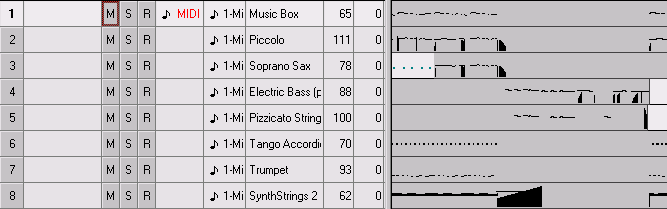
An arrangement as instructions: separate tracks name instruments such as Music Box, Piccolo, and Trumpet, with musical events laid out beside them.
Related reading
 INTERNET HISTORY
MP3
Music left the shelf, filled the hard drive, and went everywhere with you. MP3 helped make that possible.
 INTERNET HISTORY
RealPlayer
Click the clip. Open the player. Wait for the internet to catch up.
 RELATED TERM
Lossless and Lossy Compression
Lossless compression preserves the information needed to reconstruct the original data. Lossy compression discards information to reduce the encoded size.