
Glossary term
Windows Media Player
Windows Media Player is Microsoft’s long-running family of software for playing and organizing audio and video. Its classic versions helped turn a Windows PC into a place to copy CDs, build playlists, and carry a music collection onto other devices.
The computer was becoming the stereo. You could put in a CD, copy the tracks, make a playlist, and spend an unreasonable amount of time choosing what the player itself should look like.
The music needed somewhere to live
A folder full of songs was only the beginning. You wanted to find an album, play its tracks in order, put favorites together, and get them onto a disc or portable device. The player was becoming the place where you managed the collection as well as listened to it.
Microsoft’s Windows Media Player 7 preview in March 2000 brought playback, CD copying, a media library, internet radio, and interface customization into one application. The buttons made the new routine visible: the CD drive, the library, and the portable device were different stops in the same window.
The song came with a light show
Visualizations turned music into moving shapes and color. They gave a screen something to do while the speakers did the useful work. Choosing another one was a perfectly good way to postpone whatever else you had opened the computer to do.
Skins went further, changing the player’s appearance and sometimes the arrangement of its controls. Microsoft’s December 2000 Bonus Pack even included a tool for importing Winamp skins. Personalizing the software had become part of the listening experience.
Getting the collection out of the computer
A library on the hard drive was useful at the desk. Taking it elsewhere meant another job: making a CD or transferring selected music to a compatible device. You had to think about what would fit and what that device could play.
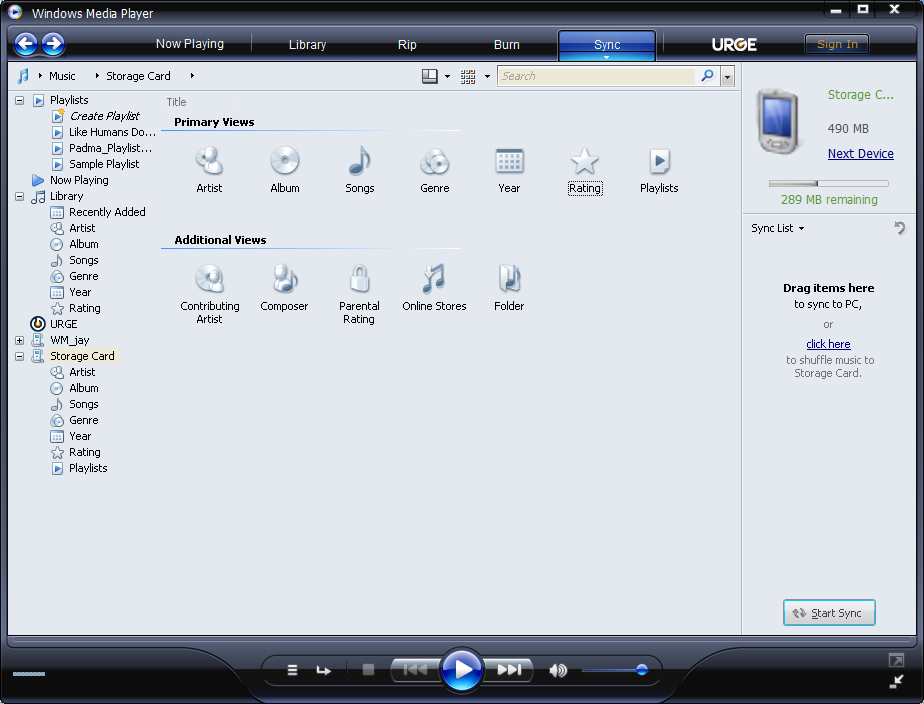
A user’s 2006 look at Windows Media Player 11 puts that job ahead of the new appearance: syncing music with a Pocket PC phone was his reason for using it. The screenshot below shows a storage card and remaining capacity. Your music could go with you, but somebody still had to pack it.
The files, the player, and the service
Windows Media Player could play MP3s; Microsoft also promoted its own Windows Media Audio format. Choosing an application and choosing a file format were separate decisions, even when the software encouraged you toward its maker’s format.
The distinction matters now that so much listening happens inside a subscription service. A local library lets you organize files already on your computer. A service supplies access to its catalog under its own terms. The familiar Play button can sit on top of either arrangement.
The classic application has not simply vanished. Microsoft lists Windows Media Player Legacy as an optional feature in Windows 10 and 11, alongside a newer app called Media Player.
Ephemera
A player with room for a light show, then the less glamorous business of fitting the music onto a device.

Frequently asked questions
Does Windows Media Player still exist?
Yes. Microsoft lists Windows Media Player Legacy as an optional feature in Windows 10 and Windows 11. The newer Media Player app is a separate application; availability and features depend on the Windows edition and version.
Can Windows Media Player play MP3 files?
Yes. MP3 is among its supported audio formats. Windows Media Player is the application; MP3 and Windows Media Audio are file formats it can work with.
What were Windows Media Player skins?
Alternative designs for the player’s interface. They could change its shape, appearance, and controls. They were different from visualizations, which created moving graphics in response to the music.
What did ripping a CD mean?
Copying the CD’s audio into files on a computer. Windows Media Player offered this alongside library management and, depending on the version and device, ways to burn discs or transfer music.
Related reading
 INTERNET HISTORY
MP3
Music left the shelf, filled the hard drive, and went everywhere with you. MP3 helped make that possible.
 INTERNET HISTORY
QuickTime
Before video felt built into the web, there was a player to open and a trailer worth waiting for.
 INTERNET HISTORY
RealPlayer
Click the clip. Open the player. Wait for the internet to catch up.
 DOCUMENTING THE WEB
Digital Rights Management (DRM)
Digital rights management (DRM) is software that controls how digital media can be accessed, played or copied. In the music-download years, it put restrictions around files people had become used to moving around freely.
Sources
- Microsoft introduces the Windows Media Player 7 preview, March 2000
- Microsoft’s December 2000 Bonus Pack: skins, visualizations, and format conversion
- A contemporary user’s Windows Media Player 11 screenshots, May 2006
- Microsoft: Windows Media Player Legacy and current support
- Microsoft: codecs and Windows Media Player